What the Two Algorithms Do
Every focus-stacking program faces the same decision at every point in the image: of all the frames that recorded this patch of subject, which one gets kept? The difference between PMax and DMap comes down to what each one accepts as evidence. That one difference — contrast versus depth — explains almost everything the two disagree about, from micro-contrast to how dark a background turns out.
PMax is short for pyramid maximum, the name Zerene Stacker gives to the method the files on this site are rendered with. It works at several resolutions at once, from a coarse blur of the whole frame down to individual pixels, and at every point on every level of that pyramid it keeps whichever frame's pixel is locally strongest: the sharpest, highest-contrast one. It never builds a model of the subject. It simply lets sharpness win, everywhere in the image.
DMap, the depth-map method, works the other way around. It first estimates, for every point in the image, which frame was taken closest to the depth where that point is actually in focus, which produces a smooth surface of frame numbers across the image. It then renders each region by sampling the frames whose focus distance matches that surface, rather than taking a single winner. Depth decides what gets used; contrast only breaks ties.
The Demonstration
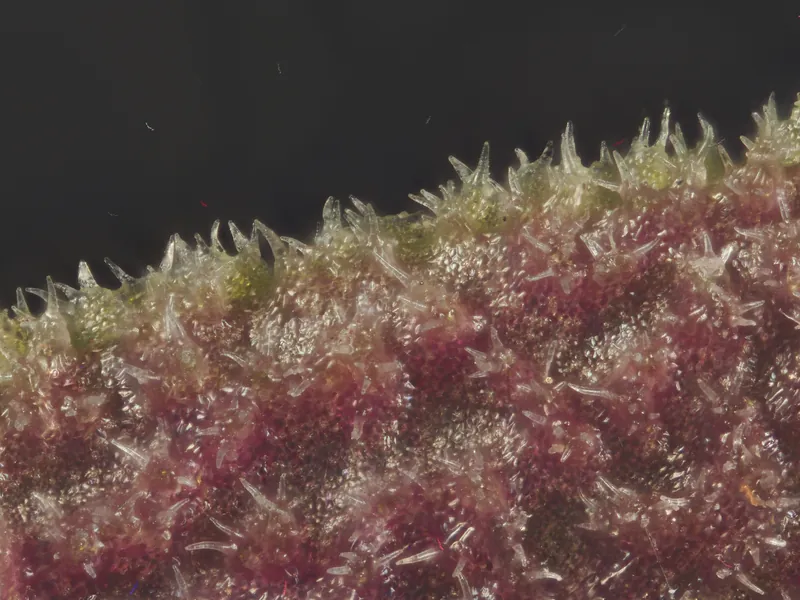
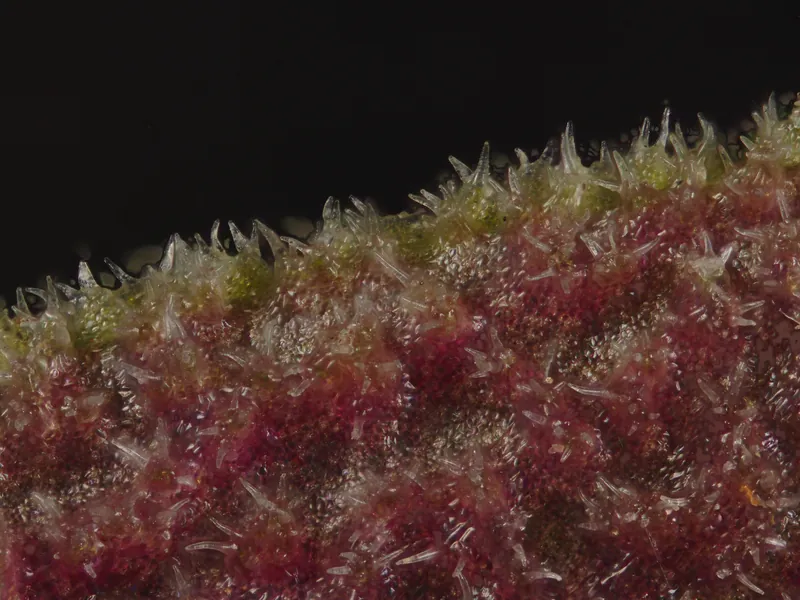
The subject is the undersurface of a Lepanthes aculeata leaf at 5× magnification, a deliberately difficult choice. A row of translucent marginal trichomes crosses in front of a dark void, the epidermis between them carries a granular field of papillae, and the stack geometry is deep enough that out-of-focus light is present in many frames. One source stack was rendered twice, once with each algorithm. Three things are worth comparing: the micro-contrast across the epidermis, the shading of the trichomes, and the darkness of the background behind the leaf margin.
Where PMax Wins
On hairy, translucent or overlapping subjects PMax is very hard to beat. Because it never has to work out what belongs at which depth, structures that overlap from the camera's point of view do not confuse it; every point simply takes its sharpest contributor, wherever that contributor sits in the stack. Thin translucent hairs, exactly the kind of structure that gives depth estimation trouble, come through with full micro-contrast. The lowest-contrast genuine detail also survives: the granular papillae between the larger trichomes are fully resolved in the PMax render above.
The price is that contrast is all PMax looks at, and contrast is not the same thing as accuracy. Around high-contrast edges it can leave bright halos where a trichome tip meets the dark background. Tonal transitions across curved surfaces turn abrupt and slightly etched, and the file takes on a crunchy, over-detailed look that reads more like illustration than photograph. Most seriously — and this is the subject of the next section — anything in the frame that carries local contrast gets promoted to structure, including light that was never sharply recorded at all.
Where DMap Wins
DMap's depth-first approach produces the more photographic file. Tonal transitions across curved structures stay smooth because neighbouring frames contribute instead of a single winner, and the three-dimensional form of a rounded trichome is modelled by gradual shading, the way a lens actually sees it. Defocused light tends to be rendered as what it is — soft blur — because as far as depth is concerned it belongs to the background, and the depth estimate says so. Backgrounds stay dark and quiet instead of picking up texture.
Its weaknesses are the mirror image of PMax's strengths. Anything that looks like out-of-focus haze is at risk of being discarded along with the haze, because depth estimation struggles to tell faint-but-sharp from soft-and-defocused, and it is the genuinely fine, low-contrast detail that gets lost. Where thin structures cross in front of others, the estimated surface can tear, leaving soft ghosts or missing hairs entirely. On this leaf, compare the papillae field between the trichomes in the two renders above: part of what PMax resolves cleanly has partly dissolved in the DMap version.
Haze and False Texture
Note 01 covers the physics of haze, so the short version will do here: when a foreground structure sits far enough ahead of the surface behind it, its defocused light is scattered across the sensor in every frame where that background is sharp. The uncontaminated image does not exist anywhere in the stack; the haze is real, physically present light. What Note 01 could not cover is what the stacking algorithm does with that light, because that is where the two methods genuinely diverge: the same veiled pixels become two different images.
DMap, guided by depth, tends to assign veiled regions to the background and render them as soft blur: dark, quiet, and obviously out of focus. PMax, guided by contrast, looks for the strongest pixel at every point, and in a veiled region the strongest pixel is often a fragment of structured glare rather than anatomy. Haze comes out looking like substance: granular texture where there should be nothing, milky veils clinging to structure, glowing outlines where the leaf has nothing at all. The artifact is not added after the fact; it is promoted from inside the recorded light itself.
The two figures below are cropped from the same coordinates of each render, at native resolution — the region just behind the leaf margin where translucent trichome tips cross the dark background. In the PMax crop, the background carries a fine granular texture and a milky veil clings around the trichome bases. None of that is on the leaf. In the DMap crop the same region resolves to near-black, with the soft defocused discs of out-of-focus highlights. These are two different photographs of the same structures, and only one of them describes the leaf accurately.
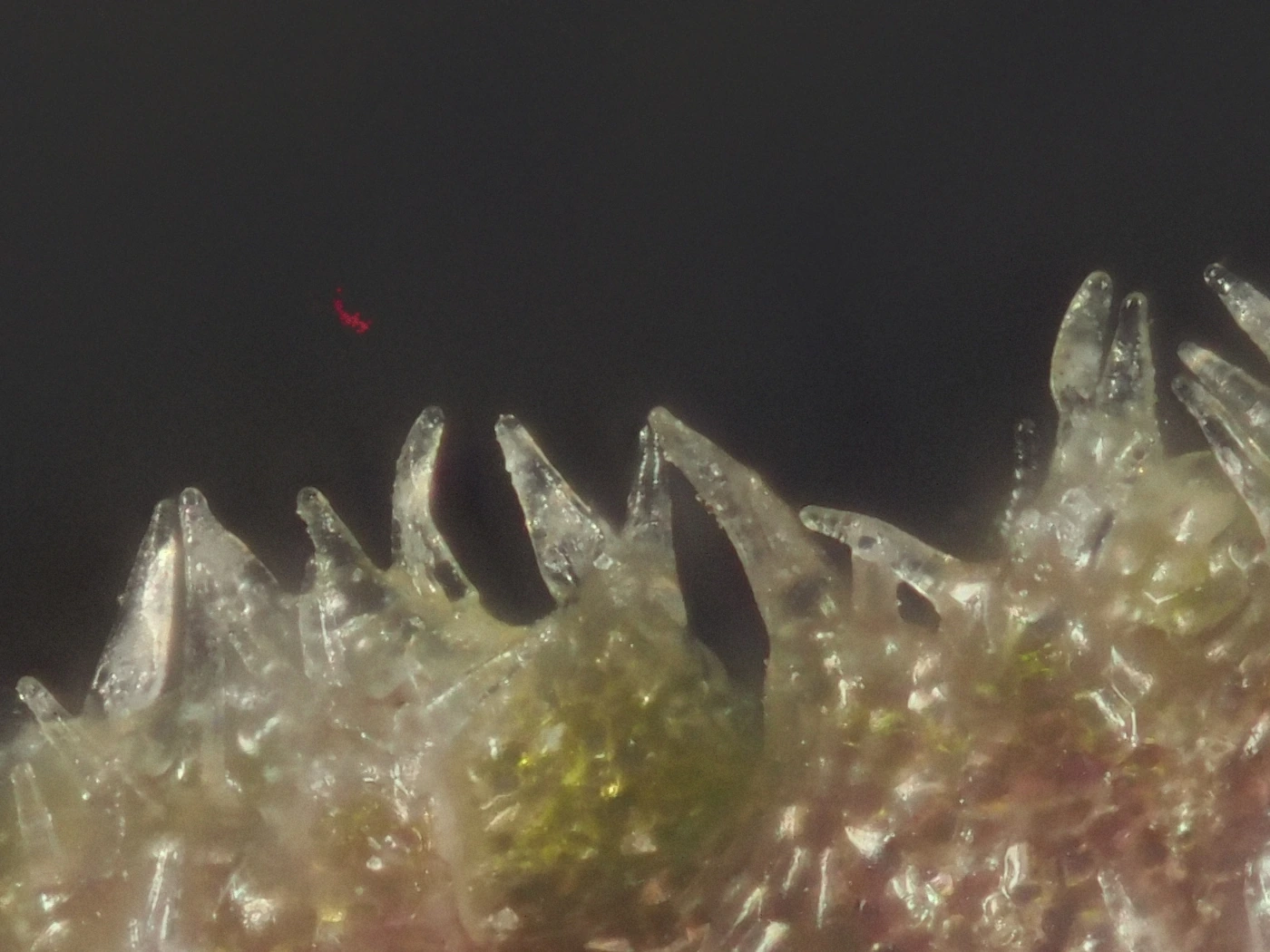
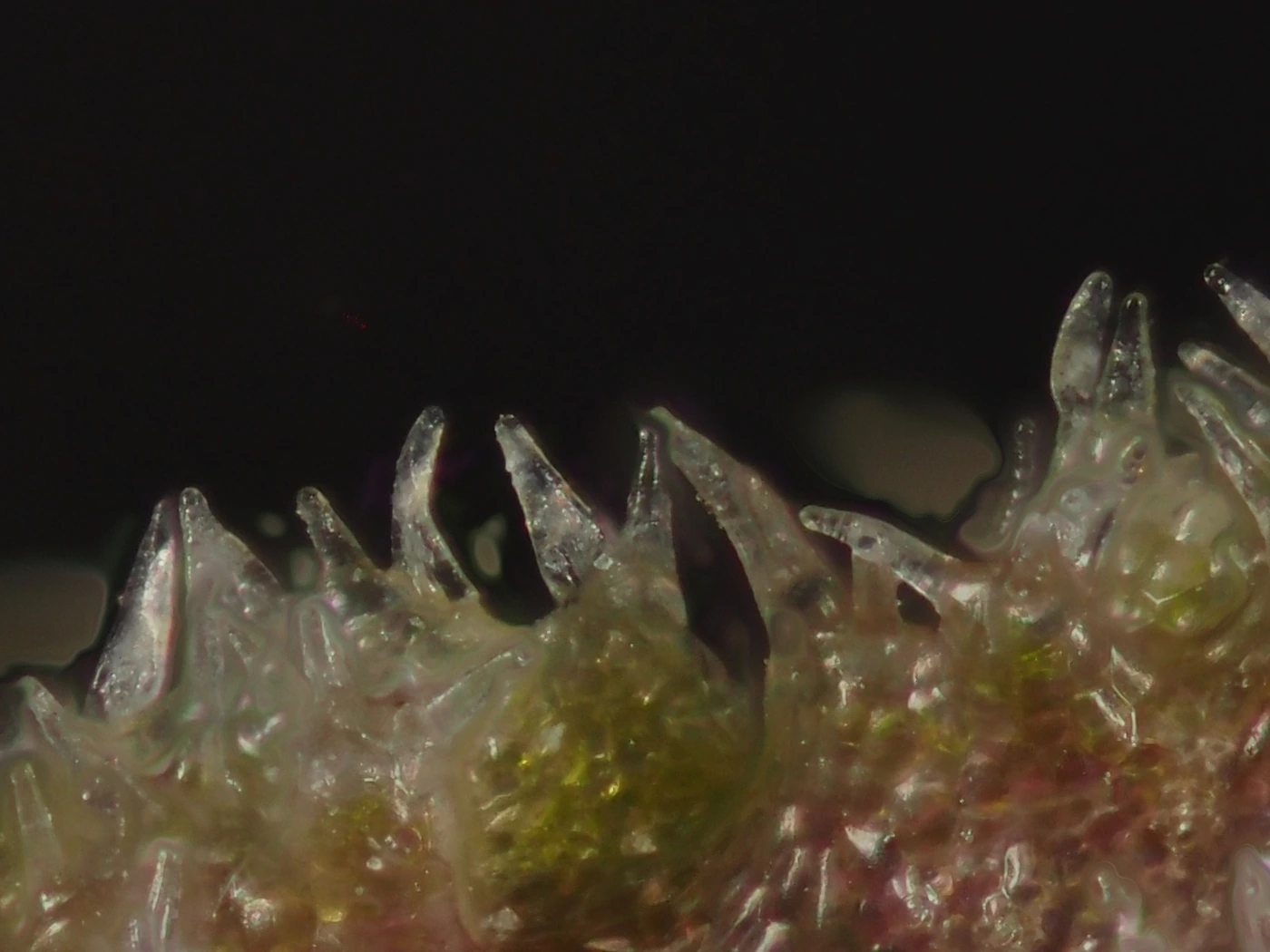
The difficult part is how plausible the false texture looks. With a single render and nothing to compare it against, a viewer cannot reliably separate invented granularity from genuine papillae, because both carry the same local contrast. For scientific work, the output of a stacking algorithm should be checked rather than trusted: where the two renders disagree about structure, at least one of them is wrong, and only the source frames can say which.
Choosing Between Them
The simplest working rule costs very little: render the stack both ways before judging anything. Doubling the render time costs minutes; using the wrong algorithm for the subject can cost the credibility of the image. Beyond that, the subject and the background do the deciding.
- Render both, compare at 100%. The differences that matter — false texture, dissolved detail, halos — are invisible at fit-on-screen magnification.
- Favour PMax for hairy, translucent or overlapping subjects — orchid lips, trichome fields, anything where depth estimation will struggle — and budget retouching time for the haze regions it will create around them.
- Favour DMap for smooth surfaces, deep stacks and dark backgrounds, where its clean handling of defocused light does most of its work and its losses matter least.
- Check disagreements against the source frames. Step through the frames near the depth in question; structure that appears in no single frame is an artifact, whichever render carries it.
- Retouch from the alternate rendering. The standard workflow for exhibition work on this site is a PMax subject blended by hand with a DMap background — each algorithm used for the part of the image it handles best.
The stacking algorithm is not a neutral piece of software; it makes claims about the subject. PMax delivers maximum detail and invents some of it. DMap renders defocused light honestly and loses some genuine detail along with it. When the two disagree about a structure, the source frames settle the question, and it is worth checking before the file goes out.
Note 01 — Haze & Halos: the physics of why the clean frame never exists →